Categories
News Photoshop

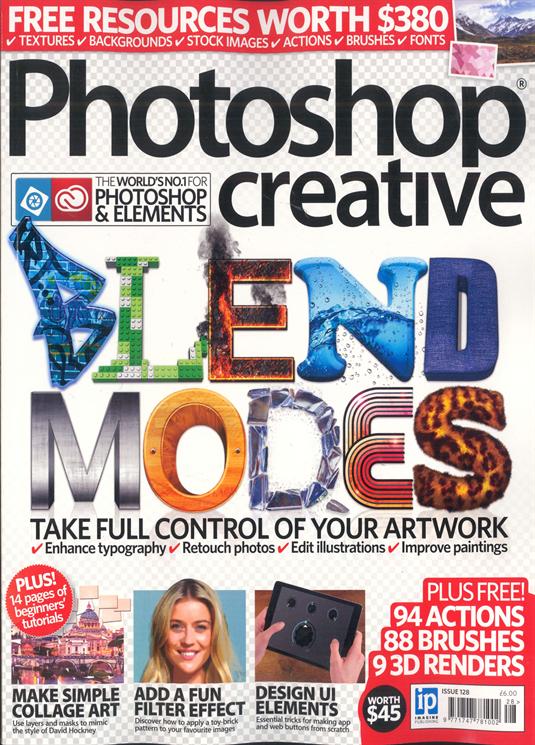
New Photoshop Creative magazine issue129

PS_logo_sm

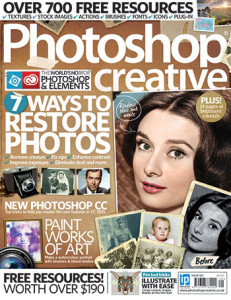
The latest issue of Photoshop Creative magazine is out now.

Restore your old and damaged photos with our amazing restoration guide! We’ll teach you how to remove creases, scratches and rips, and how to fix contrast, exposure and colour issues. We’ll even show you how to recolour a black-and-white image.

Beautiful tutorials that will show you how to paint watercolour portraits, master the Pen tool, create a caricature, add fun effects with layers and masks, and much more!

14 pages of tutorials in our Photoshop For Beginners section, this issue focusing on the new glyphs feature in the Text tool, designing your own craft materials and isolating colour.

Your images in the Readers’ Gallery and a chance for you to wins G-DRIVE storage device and Adobe Fotolia subscription!

$190 worth of amazing Photoshop resources including 40 actions and 127 brushes!

Get your copy now from all good newsagents and supermarkets.
Ps129

Categories
News Photoshop

Photoshop CC Easter Egg

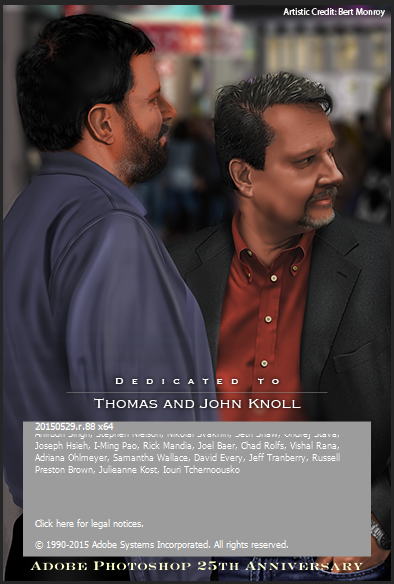
With many of the previous versions of Photoshop, there has been a hidden Easter egg splash screen, and the latest version (Photoshop CC 2015) is no exception.

Once Photoshop CC  2015 has loaded, hold down the Control key on your keyboard, go to the Help menu, and click on About Photoshop CC…

You will be presented with the hidden Splash screen, which for all those that can’t wait to see it, is a dedication to Thomas and John Knoll.

Photoshop CC 2015 Easter Egg Splash Screen


This painting is by the amazing Bert Monroy and  is part of his mightily impressive Times Square Painting.

Categories
News Photoshop

New Photoshop Download

Hi All,

A small selection of dust type brushes has been applied to Download section of the site.

Enjoy.

Get your Dust Brushes Here

Categories
News Photoshop

Photoshop Creative Issue 128

PS_logo_sm

The latest issue of Photoshop Creative is now on sale.

Officially the world’s best Photoshop magazine, Photoshop Creative is jam-packed with practical Photoshop advice and incredible step-by-step tutorials for all abilities and versions. Discover the full potential of blend modes this issue, and see how they are essential when it comes to photo editing, illustrating, painting and creating eye-catching text effects like the typography on the cover. There are also step-by-step guides on transforming portraits, creating manga-style cartoons, designing UI elements for apps and the web, and much more. We also have beginner guides on the Reduce Noise filter, designing simple posters with the Pen tool, fixing shadows and lighting, and other essential edits

Grab your copy today from all good newsagents and supermarkets.
Photoshop creative issue 128
Categories
Crafting News

The End of Complete CardMaking

Complete Cardmaking  was a magazine dedicated to digital card crafting. The latest issue was due out today (18th June 2015).

However  from information from Practical Publishing International, the makers of the magazine, have stated that a difficult decision has been made to close Complete Cardmaking magazine due to financial reasons.

The last issue of Complete Cardmaking magazine is issue 56.

This is a sad post as Complete Cardmaking was an excellent magazine for the digital crafting community.

With regards to digital craftng stay tuned to Rex Co Media for digital downloads including, sentiments, papers, and digi-stamps.

Categories
News Photoshop Photoshop Touch

New Apps for Android

With the sad news that Photoshop Touch will no longer to supported, and in fact it has now been taken down from both the android and iTune stores. This has left a bit of a gap for Photoshop Touch users.

On looking at various forum boards the general trend is that most people still are shock and disappointed with this decision.

However, as a bit of good news Adobe has released ahead of schedule 4 apps, although not new, for Android for the first time.

Adobe Photoshop Mix, Adobe Color, Adobe Shape CC and Adobe Brush are now available in the Google Play store for Android.

Previously these apps were only available for iPad users.

There is however a bad point to this though. I believe that due to the rush of the release of these apps to Android, a proper bug testing has not been done.

From comments on the Google Play Store for these apps the majority state crashes, apps not working and general bugs.

Also at time of writing this, only Adobe Color is available for tablets, why I have no idea.

Hopefully bug fixes and release on tablets will be very soon.

A full look at all the (new) apps will appear on Rex Co Media, so keep tuned in.